
How to Find Where a Picture Was Taken on iPhone (3 Ways)
By Sam D. · · 6 min read
Short answer
Open the picture in the Photos app and swipe up, or tap the Info button. If the photo carries GPS data, a small map appears under the date and time. If there is no map, use Collections > Map to confirm, or estimate the place from what the image shows.
Find where your photo was taken
Upload a photo: GeoSpy AI reads its GPS data if it has any, and otherwise estimates the place from what it shows.
Your iPhone can usually tell you where a picture was taken, but only if the picture was saved with a location in the first place. That depends on one setting and on how the photo reached your phone. This guide covers three ways, from the quickest to the one that works when the file has no location at all.
Menu names below follow Apple’s current iPhone guides for iOS 26 and iOS 27, and where the two differ, both are given. Apple moves buttons around between releases, so if a label on your phone differs slightly, look for the Info icon (an i in a circle) or the More menu (three dots) instead.
How do you find where a picture was taken on iPhone in Photos?
Open the photo in Photos, then swipe up on it or tap the Info button. If the picture has GPS data, a map and place name appear below the date and time. Tap the map to open it larger in Maps.
- Step 1Open the pictureIn Photos, tap the photo you want to check.
- Step 2Reveal its detailsSwipe up on the photo, or tap the Info button. Apple lists the capturing device, camera data and the location here.
- Step 3Read the mapA map thumbnail with a place name sits under the date. That is the spot recorded when the shot was taken.
If you see only a date and camera details, the photo has no stored location. That is common for pictures saved from messaging apps, downloaded from the web, or taken with Location Services off for the Camera app. Why photos lose their location when shared explains where it goes.
How can you see all your photos on a map on iPhone?
Open Photos, tap Collections, scroll to the Map collection under Pinned and tap it. Only photos with embedded GPS data are shown. The layout of Collections changes between iOS versions, so you may need to scroll to find Map.
This is the fastest way to confirm a hunch. If a trip you remember is missing from the map, those photos have no location. If you tap a cluster of pins, Photos shows the pictures taken in that area, which also helps when you know roughly where a shot was taken but not exactly.
To see the raw fields rather than a map, you can view the full EXIF data on an iPhone. That is also how you check the exact coordinates and the timestamp.
What can you do when a picture has no location data?
Look at the image itself. Signs, architecture, vegetation and light narrow down a place, and a reverse image search can match a landmark. An AI photo location tool can estimate a city and country when no GPS tag exists.
Most pictures people ask about are screenshots, saved web images or photos sent by someone else, so there is nothing to read. Three practical fallbacks, in order:
- Read the visible clues: street signs, shop names, licence plates, road markings, language and the style of the buildings. How to find a photo’s location without EXIF walks through them.
- Run a reverse image search. Reverse image search on a phone shows how to do it from the Photos app, and it works best for landmarks and widely shared pictures.
- Ask an AI location tool. GeoSpy’s photo location finder reads GPS from the file if it exists, and otherwise estimates the city and country from what the picture shows, with a confidence score on a map.
Be clear about what the estimate is. The result is the point the AI found, with its coordinates, when it is highly confident, and otherwise an approximate area. For a photo with no GPS data, such as a street of Victorian row houses, the site’s own sample returns San Francisco, USA, with 100% confidence, and a photo of Kyoto returns Japan at 95%. Treat any estimate as a lead to verify against a map, not a verdict.
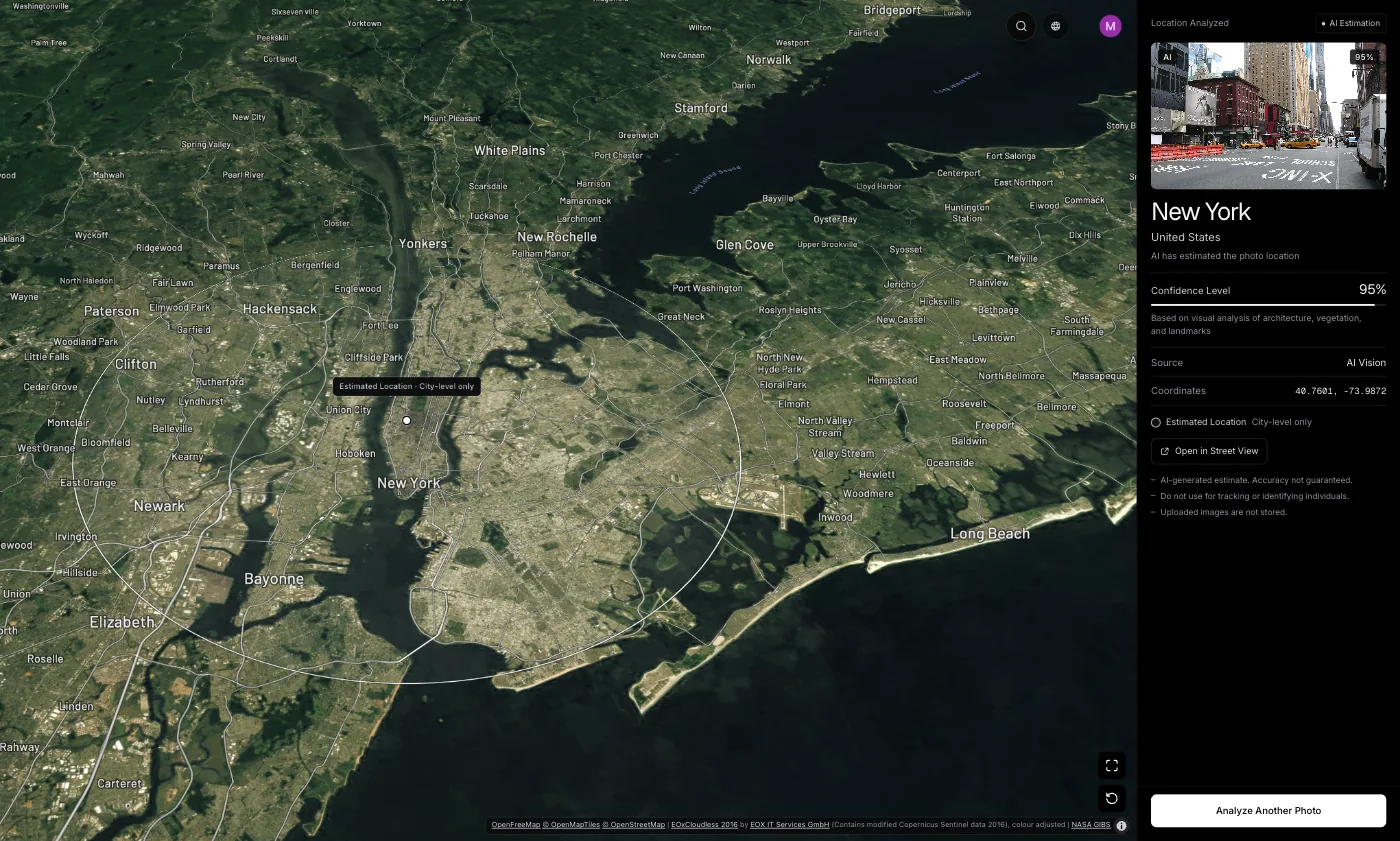
On the website, photo analysis needs a subscription ($9.99 a week or $39.99 a year, cancel any time) or $1.99 once for a single photo. If you work on a laptop, the Chrome extension lets you right-click a photo on any page to analyse it.
How do you stop your iPhone saving or sharing a photo’s location?
To stop saving it, go to Settings > Privacy & Security > Location Services > Camera and choose Never. To remove it from a saved photo, use More > Adjust Location > No Location; on iOS 27, tap Adjust Info first. On iOS 26, Share > Options > Location off leaves it out of one share.
These are the same steps Apple lists in its personal safety guide. Our walkthrough on turning off location for iPhone photos covers the trade-off: with Camera location off, the Map collection and Memories lose those pictures too.
Frequently asked questions
- Why does my iPhone photo not show a location?
- Either Location Services was off for the Camera app when the picture was taken, or the file has been through an app that removed the tag. Screenshots and images saved from the web never had one. Photos only shows a map when GPS data is embedded.
- Where is the Map in Photos on iOS 26 and iOS 27?
- Open Photos, tap Collections and look for the Map collection under Pinned. Apple has rearranged Collections in recent releases, so you may need to scroll sideways or down. It lists only photos that carry GPS data. Apple’s iOS 26 and iOS 27 guides also put the whole library on a map: tap Library, the Sort and Filter button, then Show Map.
- Can I find where a screenshot was taken on iPhone?
- A screenshot has no GPS of the scene, so the map will be empty. You can still estimate the pictured place from visible clues or an AI tool. See the guide to whether screenshots have location data.
- Is the location on an iPhone photo exact?
- It is the GPS fix at capture, typically within a few metres under open sky and worse near buildings or trees. It can also be edited afterwards with Adjust Location, so a pin is a strong clue rather than proof.
- Can someone see where my iPhone photo was taken if I send it?
- Yes, if the shared file keeps its location and the app passes it on. On iOS 26, tap Options in the Share sheet and turn Location off to send a copy without it. Apple’s iOS 27 guide lists no Location switch there, so on iOS 27 remove it first with No Location. Many social apps also strip the tag on upload.
Sources
- See photo and video information on iPhone (iOS 26) — Apple SupportSwipe up or tap Info; capturing device, camera data and location. Adjust Location is in the More menu.
- See photo and video information on iPhone (iOS 27) — Apple SupportThe same details; Adjust Location sits under Adjust Info in the More menu.
- Share photos and videos on iPhone (iOS 26) — Apple SupportOptions > Location off before you share.
- Share photos and videos on iPhone (iOS 27) — Apple SupportThe iOS 27 share options: Keywords, file format and All Photos Data, with no Location switch listed.
- Manage location metadata in Photos — Apple Support (Personal Safety guide)Map collection, Adjust Location, and sharing without location.
- GPS Accuracy — GPS.govSmartphones are typically accurate to within a 4.9 m (16 ft) radius under open sky.
Keep reading
How to View EXIF Data on iPhone
See the camera settings, timestamp and GPS location stored in any iPhone photo — using the built-in Photos app, with no third-party tool required.
· 4 min read
How to Turn Off Location on iPhone Photos
Three switches control location on iPhone photos: one for new shots, one for photos you already took, one for each share. Steps for iOS 26 and iOS 27.
· 8 min read
Your Photos Can Carry Your Location. The Army Learned the Hard Way
In 2007, soldiers’ photos showed insurgents where four Army helicopters stood. When phones save location in photos, who can see it, and how to check yours.
· 11 min read
How to Find Photo Location Without EXIF Data
The metadata is gone, so what is left? Three approaches that work on a stripped photo, what each realistically achieves, and where they stop.
· 5 min read
Do Screenshots Have Location Data?
A screenshot is a new image, so it never inherits the original photo’s GPS tags. What it does carry, and why that still does not make it anonymous.
· 4 min read