
Where Was This Photo Taken? Upload It and Find Out
Upload the photo you want to place
GeoSpy AI checks the file for GPS coordinates first. When there are none, it estimates the city and country from the buildings, signs, plants and light in the picture.
By Sam D. · · 4 min read
Short answer
To find out where a photo was taken, check its GPS data first: many phone photos store exact coordinates. If the data was stripped, as it is on most social platforms, read the scene itself. GeoSpy AI does both, reading any GPS in the file and otherwise estimating the city and country from what the image shows.
How do you find out where a photo was taken?
Two routes, in this order: the GPS coordinates stored in the file, then the evidence in the picture itself. The first is exact when it exists; the second works on almost any photo of a real place.
A photo taken on a phone with location services on usually carries its coordinates in its EXIF data. That is a reading, not a guess: a smartphone fix is typically good to about five metres under open sky. If the file still has it, the GPS coordinates answer the question outright.
Most photos you are curious about no longer have it. Messaging apps and social platforms remove location data when a photo is shared, which is why photos lose their location on the way to you. What survives is the scene: the style of the buildings, the script on a sign, the road markings, the plants, the angle of the sun.
- Step 1Upload the photoA JPG or PNG up to 10 MB, from your phone or computer.
- Step 2The file is checked for GPSIf coordinates are there, they are read and shown on the map.
- Step 3The scene is readWithout GPS, an AI model estimates the city and country from what the photo shows, with a confidence score.
What does the result look like?
A map with a confidence score: the point the AI found, with its coordinates, when it is highly confident, an approximate area when it is not, or the exact point when the file has GPS. A photo with nothing distinctive in it may not be placed at all.
| What the photo contains | What you can expect |
|---|---|
| GPS coordinates in the file | The exact point, read rather than estimated |
| A famous landmark | The city, often the very spot |
| A street with signs and shopfronts | The city or the district |
| Countryside or a coastline | The country or the region |
| A room, a close-up, a plain wall | Usually no meaningful answer |
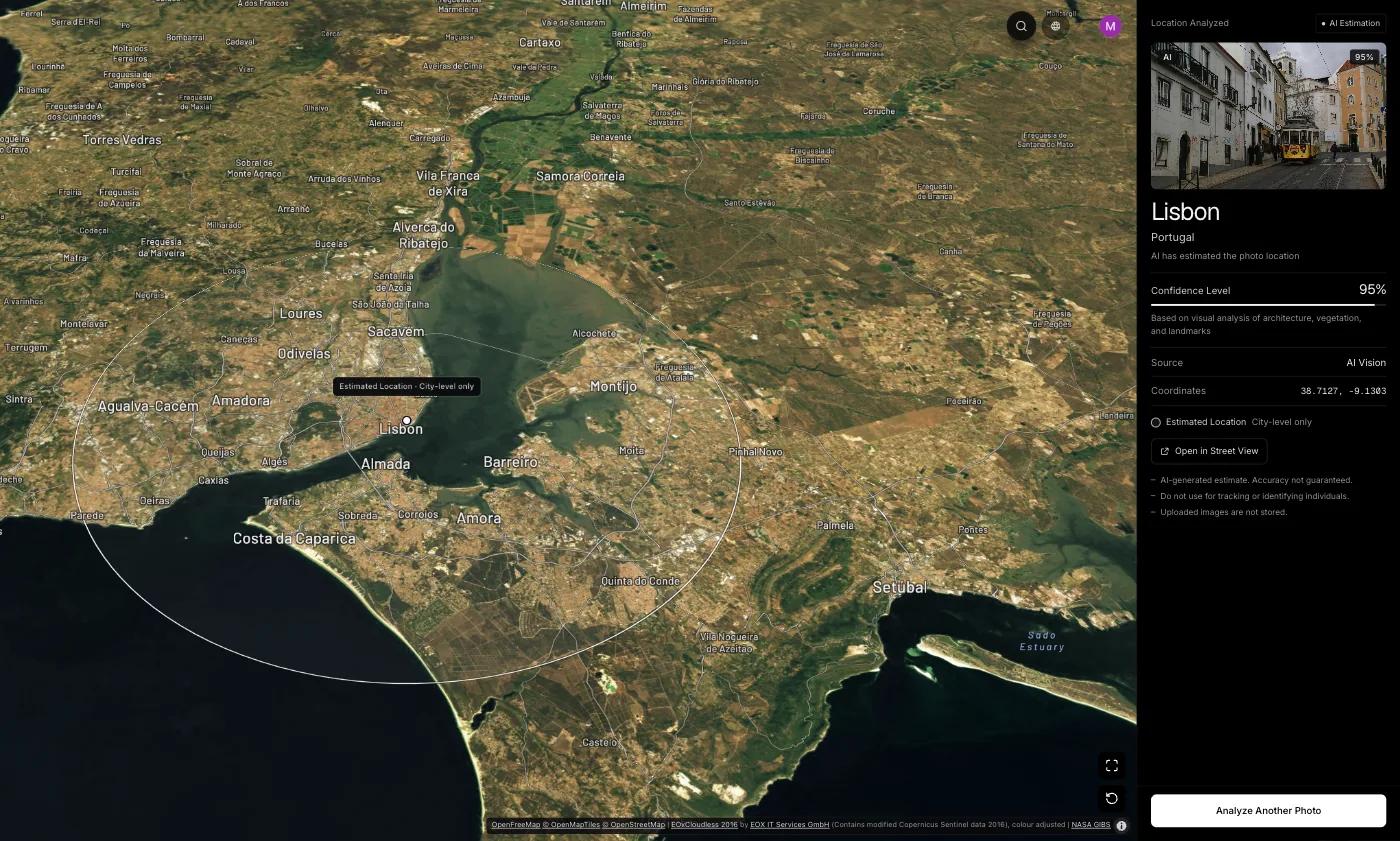
One of the sample results shown on this site is a street photo of San Francisco’s Victorian row houses with no GPS data left in the file: GeoSpy AI placed it in San Francisco, USA, with 100% confidence. Houses like these, a steep street and the trees are exactly the kind of evidence the model reads.
How accurate is it?
Expect the right city or region for a photo of a recognizable place, and less for generic scenes. Even research systems estimate areas, not addresses.
The best published research shows where the ceiling is. PIGEON, a Stanford model presented at CVPR 2024, placed 40.36% of its test images within 25 km of the true spot, with a median error of 44.35 km. That is remarkable for a single picture, and it is still a region rather than a doorstep. How AI geolocation works explains why.
What if the photo cannot be placed?
Try a reverse image search to find the photo published somewhere with a caption, then read the scene by hand for country clues.
A photo that has been online before may be found with a reverse image search, together with the page that says where it was taken. A photo nobody has published can still give away its country through small details like signs and road markings. The complete guide walks through every method in order.
On the website, photo analysis comes with a weekly or yearly subscription that you can cancel any time, or a one-time purchase for a single photo; the GeoSpy iPhone app has a free trial. How the photo location finder works has the details.
Frequently asked questions
- Can you find where a photo was taken from the picture alone?
- Often, to the city or region. Buildings, signs, road markings and vegetation narrow it down; a famous landmark can pin the exact spot. A close-up or an indoor scene usually cannot be placed.
- Does a screenshot show where a photo was taken?
- No. A screenshot records where and when the screenshot was made, if anything, not where the original photo was taken. Only what is visible in the picture can help.
- Can you see where a photo on Instagram or Facebook was taken?
- Only through a location tag the poster added. Both platforms remove GPS data from uploaded photos, so the file itself no longer says where it was taken.
- Is it free?
- The Street View guessing game on the site is free once a day. Photo analysis on the website comes with a subscription of 9.99 US dollars a week or 39.99 a year, or 1.99 US dollars once for a single photo; the iPhone app has a free trial.
- What happens to the photo I upload?
- It is sent to the AI model for the analysis and not stored on our servers afterwards. What is kept is a record that an analysis happened and its estimated city and country.
Sources
- GPS Accuracy — GPS.govSmartphones are typically accurate to within 4.9 m under open sky.
- PIGEON: Predicting Image Geolocations — arXiv — Haas, Skreta, Alberti and Finn40.36% of test images within 25 km; 44.35 km median error.
- Exif 3.1 (CIPA DC-008-2026) — Camera & Imaging Products AssociationThe standard that defines the GPS tags in a photo file.
Keep reading
How to Find Out Where a Photo Was Taken
Four ways to work out where a photo was taken: GPS metadata, reverse image search, AI geolocation and reading the image itself. What each can and cannot do.
· 7 min read
How to Find Photo Location Without EXIF Data
The metadata is gone, so what is left? Three approaches that work on a stripped photo, what each realistically achieves, and where they stop.
· 5 min read
How to Find GPS Coordinates in a Photo
Read the exact latitude and longitude stored inside a geotagged photo, understand the degrees-minutes-seconds format, and know how far to trust the numbers.
· 4 min read
How to Identify a Country From Photo Clues
Regulated things beat natural things. The clues that change abruptly at borders, ordered by how much each one narrows the search and how fast you can read it.
· 4 min read
Where Is This Beach? How to Find a Beach From a Photo
Where is this beach? Read the sand, rocks, water, lifeguard flags and signs in the photo, then match the coastline on a map to name the exact beach.
· 7 min read