
GeoSpy for Chrome
GeoSpy Chrome extensionRight-click any photo. See where it was taken.
Find where a photo on any web page was taken, without downloading it. The answer opens in Chrome’s side panel, right next to the page you are reading.
Free to install · Photo analysis with GeoSpy Premium
- Access only to geospys.com
- Nothing is read until you right-click
- English · Türkçe
Three steps, no downloads
Set up once, then it is one right-click away on every site.
Add it to Chrome
One click on the Chrome Web Store. It needs Chrome 116 or later on a computer.
Sign in on geospys.com
The extension uses your geospys.com account. Photo analysis is part of GeoSpy Premium, the same subscription as on the website.
Right-click a photo
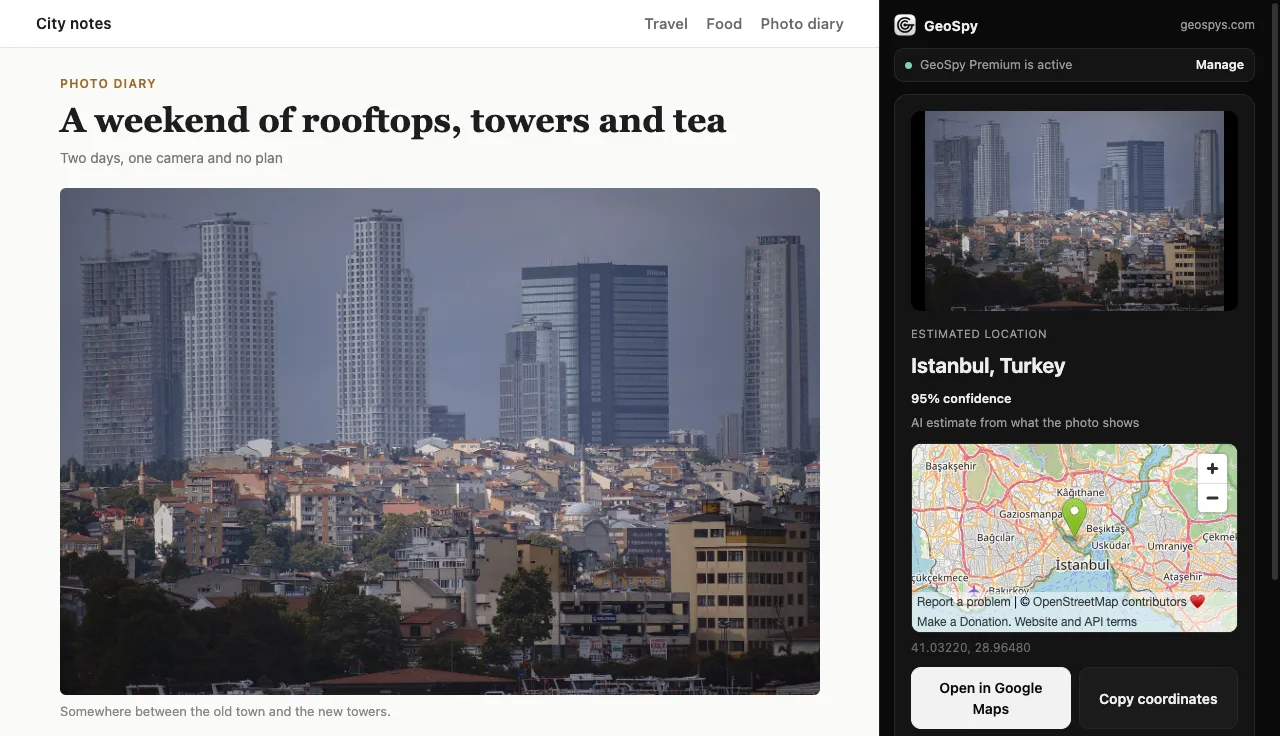
Choose “Find where this photo was taken”. The place, a confidence score and a map open in the side panel.
See it in action
From a right-click to a pin on the map, on a real photo.
What it does
Reads the photo’s own GPS first
If a JPEG still carries GPS coordinates, the answer comes straight from them, and the panel says so.
Estimates from what the photo shows
No GPS? An AI estimate from the visible clues, such as buildings, signs and terrain, with a confidence percentage.
Works where saving does not
If a site does not let the image be read, the extension uses what is on screen. WebP, AVIF and GIF are converted for you.
A map you can use
See the spot on a map, open it in Google Maps or copy the coordinates in one click.
Your own files too
Click the toolbar icon to choose a photo from your computer, drag one in, or paste it.
Stays next to your page
The side panel stays open while you browse, so you can check one photo after another.
What leaves your browser
The extension can talk to one site, geospys.com, and only reads an image after you right-click it.
Sent for the analysis
- The photo you chose, and its GPS position if it has one
- A random ID created when the extension is installed
- Your geospys.com sign-in, as on the website (the extension never reads or stores it)
Never sent
- The page you are on, other images and your browsing history
- Your photo after the analysis: it is not stored
Free to install. Analysis with GeoSpy Premium.
The extension uses the same GeoSpy Premium subscription as geospys.com: $7.99 a week or $29.99 a year. Cancel anytime from your account.
Use it responsibly: do not use GeoSpy to track or find people without their consent.
Questions
Is the GeoSpy Chrome extension free?
Installing it is free. Photo analysis is part of GeoSpy Premium ($7.99 a week or $29.99 a year), the same subscription you use on geospys.com.
Which browsers does it work in?
Google Chrome 116 or later on a computer (Windows, macOS, Linux or ChromeOS). It opens its results in Chrome’s side panel.
Does it read the pages I visit?
No. It has access to geospys.com only. When you right-click an image, Chrome lets it read that one image; nothing else on the page is read.
What happens to my photo?
It is sent to geospys.com for the analysis and is not stored afterwards. Section 11 of the Privacy Policy covers the extension in full.
Why does it sometimes use what is on screen?
Some sites do not let other pages read their images. Then the extension takes the image as it is displayed. Open the image in its own tab for full resolution.
Does it work with iPhone HEIC photos?
Not yet. Convert a HEIC photo to JPEG first; JPEG, PNG, WebP, AVIF and GIF all work.

Add GeoSpy to Chrome
Right-click your first photo in under a minute.