
How to Find Where a Picture Was Taken on Android
By Sam D. · · 6 min read
Short answer
Open the picture in Google Photos and swipe up (or tap More, then About) to see its details. In Samsung Gallery, swipe up to see the details, including a map when a location is stored. If the photo has no stored location, read the visible clues or use an AI tool to estimate the place.
Find where your photo was taken
Upload a photo: GeoSpy AI reads its GPS data if it has any, and otherwise estimates the place from what it shows.
Android phones record where a picture was taken only when the camera had permission to save a location. Whether you can see it afterwards depends on the gallery app you use, because Google Photos, Samsung Gallery and manufacturer galleries each show it in a slightly different place.
The steps below follow Google’s and Samsung’s own help pages. Menus differ by phone brand and app version, so if a label does not match, look for an Info or Details option, or a swipe-up gesture on the open photo.
How do you find where a picture was taken on Android in Google Photos?
Open the photo in Google Photos, then swipe up on it or tap More at the top and choose About. The details panel shows when it was taken and, if one is stored or estimated, where. Location appears only if the photo has one.
- Step 1Open the photoIn the Google Photos app, tap the picture.
- Step 2Open the detailsSwipe up on the photo, or tap More at the top and then About.
- Step 3Read the locationLook for a place name or map under the date and time. If it is missing, the file carries no usable location.
One detail worth knowing: Google Photos can show two kinds of location. Google’s help page says a camera may save a location with the photo, and Google Photos can also estimate one from landmarks and from other photos you took nearby. You can edit or remove estimated and manually added locations, but not the ones your camera saved. For more on how Google handles this, see photo location in Google Photos.
How do you find a picture’s location in Samsung Gallery?
Open the picture in Gallery and swipe up on it. The details show the date and time and, when a location is stored, a small map; tapping Edit lets you change them. Samsung’s steps can vary slightly by One UI version.
- Open Gallery and tap the photo.
- Swipe up on the enlarged photo to see its details.
- Tap Edit to view or change the location information.
Other brands, including Motorola, OnePlus and Xiaomi, use their own gallery apps with a similar swipe-up or Details option. If your phone’s gallery offers no location field, installing Google Photos is the simplest way to check. To inspect every stored field, including exact coordinates, you can find the GPS coordinates in a photo with an EXIF viewer.
Why is there no location on my Android photo?
Usually because camera location was switched off, or the picture came from somewhere that removes it, such as a chat app, a download or a screenshot. Pixel and Google Camera use a Save location option; Samsung calls it Location tags.
Google’s help page for camera location settings says that on Pixel and Google Camera you toggle Save location in the camera settings, and on Samsung devices you toggle Location tags. Photos taken with it off may not show up in map view, location searches or trip Memories. Check that setting first if your own recent pictures are untagged.
Pictures that arrive through messaging and social apps are a separate case, since many of them re-compress the image and drop the tag. Why photos lose location when shared lists what happens in each app.
What if the photo has no location data at all?
Work from the image. Signs, language, architecture, vegetation and road markings narrow it down, and reverse image search can match landmarks. An AI location tool can estimate a city and country when GPS is absent.
Start with the clues you can see yourself, then escalate. Finding a photo’s location without EXIF covers the manual route, and Google Lens is worth a try for landmarks. If you are not sure whether a building is a known landmark, identifying a building from a photo shows how.
For an estimate, GeoSpy’s photo location finder first reads GPS from the file’s EXIF data if there is any. If not, an AI model estimates the city and country from what the picture shows, then plots it on a map with a confidence score. The map shows the point it found, with its coordinates, when the AI is highly confident, and otherwise an approximate area. The site’s sample results include a San Francisco street of Victorian row houses with no GPS data (San Francisco, USA, 100% confidence), Kyoto (95%) and the Grand Canyon (95%).
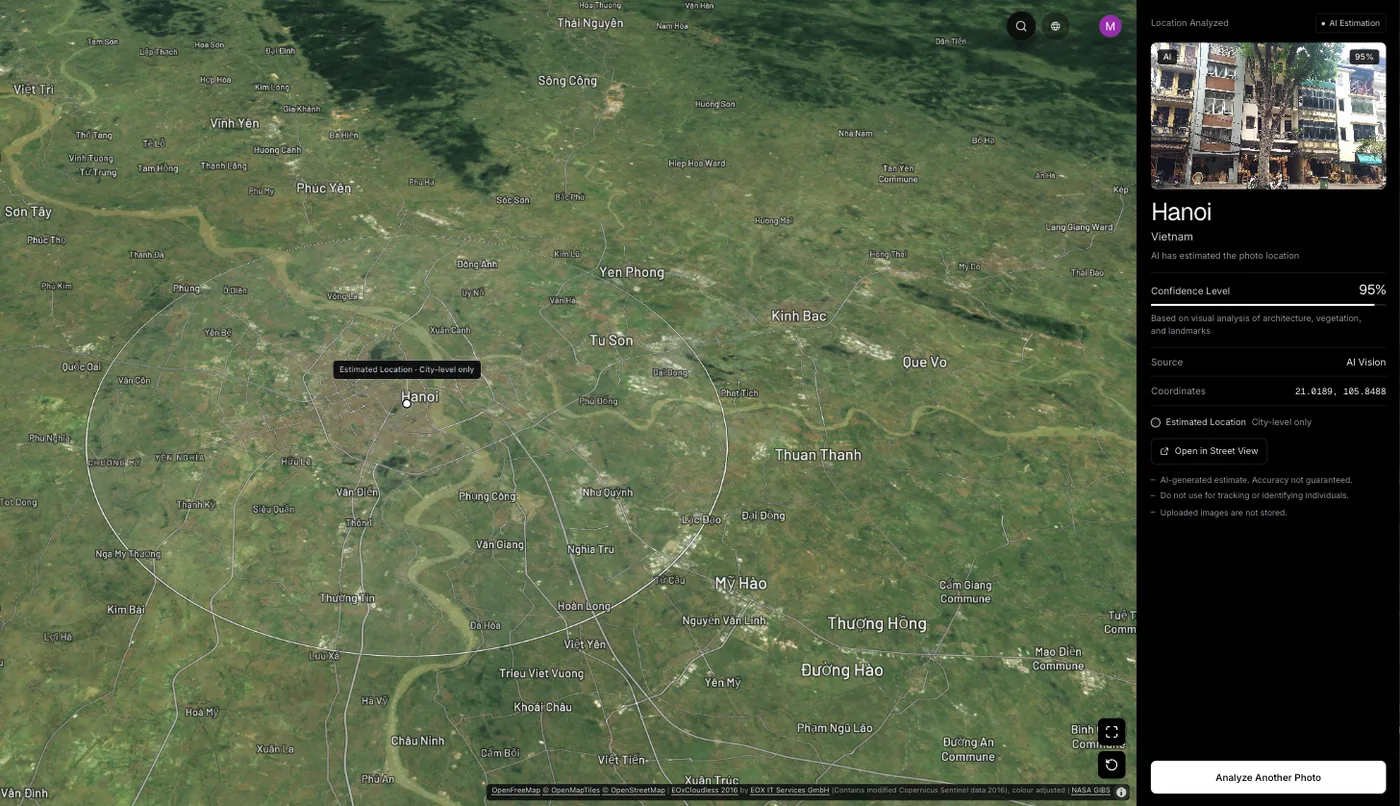
Web analysis needs a subscription, $9.99 a week or $39.99 a year, or $1.99 once for a single photo. The Street View guessing game on the site is free once a day if you only want to practise reading places, and the Chrome extension lets you right-click a photo on a page to analyse it.
Frequently asked questions
- Why does Google Photos show a location I never set?
- Google Photos can estimate a location from landmarks in the picture and from other photos you took around the same time. Estimated locations can be edited or removed; locations saved by your camera cannot be changed in Google Photos.
- Open the camera settings. On Pixel and Google Camera, switch Save location on or off. On Samsung, switch Location tags. Photos taken with it off may not appear on the map view in your gallery.
- Can I see the exact GPS coordinates of a photo on Android?
- Gallery apps usually show a place name or map. For raw latitude and longitude, use an EXIF viewer. The GPS coordinates guide explains which fields hold them.
- Can I find where a screenshot was taken on Android?
- A screenshot never had the scene’s GPS, so no location is stored. You can only estimate the pictured place from what is visible. See do screenshots have location data.
- Is it free to find where a picture was taken on Android?
- Checking the stored location in your gallery is free. Estimating a place with GeoSpy on the website needs a subscription or a one-time purchase for a single photo; the GeoSpy iPhone app has a free trial, and the Street View game on the site is free once a day.
Sources
- Understand, find & edit your photos’ locations (Android) — Google Photos HelpCamera-saved versus estimated locations, and what you can edit.
- Change your camera location settings — Google Photos HelpSave location on Pixel; Location tags on Samsung.
- How to check the date and time in the Samsung Gallery app — Samsung SupportSwipe up on the photo; tap Edit to view location information.
- GPS Accuracy — GPS.govSmartphones are typically accurate to within a 4.9 m (16 ft) radius under open sky.
Keep reading
Photo Location in Google Photos: Read It, Remove It
Google Photos shows where a photo was taken and can estimate it when there is no GPS tag. What it will not do is remove a location your camera wrote.
· 4 min read
How to Find GPS Coordinates in a Photo
Read the exact latitude and longitude stored inside a geotagged photo, understand the degrees-minutes-seconds format, and know how far to trust the numbers.
· 4 min read
Your Photos Can Carry Your Location. The Army Learned the Hard Way
In 2007, soldiers’ photos showed insurgents where four Army helicopters stood. When phones save location in photos, who can see it, and how to check yours.
· 11 min read
How to Find Photo Location Without EXIF Data
The metadata is gone, so what is left? Three approaches that work on a stripped photo, what each realistically achieves, and where they stop.
· 5 min read
Why Do Photos Lose Location When Shared?
Photos lose location because platforms re-encode uploads, not because anyone chose to protect you. The mechanism, the routes that keep it, and why it matters.
· 4 min read