
How to Find Where a TikTok Video Was Filmed
By Sam D. · · 10 min read
Short answer
Start with what the post shows: a location tag, the caption and the comments. If none names a place, screenshot the clearest frame, read signs and scenery, run a reverse image search, then try an AI location estimate. Treat every answer as a lead and confirm it against map imagery.
Find where your photo was taken
Upload a photo: GeoSpy AI reads its GPS data if it has any, and otherwise estimates the place from what it shows.
A café with a view you would like to visit, a viral clip of a "hidden beach", a news video that might be from somewhere other than claimed. The question is the same each time: where was this TikTok filmed? Sometimes the answer is one tap away. Often it is not, and then you have to read the picture.
This guide is specific to TikTok: what the app itself can tell you, why a downloaded copy will not help, and how to work from a single frame. For the general method across platforms, including FFmpeg and ExifTool commands, see our guide to finding where any video was filmed.
Does TikTok show where a video was filmed?
Only if the creator chose to add a location. TikTok’s Help Center says a poster can tag a place before publishing, and the tag then appears on the post. The option is not offered in every region, is unavailable to under-18 accounts, and some places cannot be tagged.
TikTok’s Help Center page on location information describes the feature as optional: you create a post, tap Location, and choose a suggested place or search for one. Suggestions are based on popularity and proximity, and TikTok may prompt a creator who posts without one.
Two consequences matter for you as a viewer. First, the absence of a tag means nothing: most clips never get one. Second, a tag is the creator’s claim, not a measurement. People tag the nearest famous spot, the city rather than the street, or a place they hope will bring views. Use it as the first hypothesis, never the last word.
Step 1: what do the tag, caption and comments say?
Look at everything attached to the post before you look at the picture. A tag, a place name in the caption, a hashtag such as a city name, or a comment saying "that’s the pier by the station" can solve the case in under a minute. Each is testimony to verify.
- The location tag. If one appears above the caption, tap it to see other public posts with the same tag. Do many show the same view? That is useful corroboration.
- Caption and hashtags. Travel clips are often labelled with a city, a trail or a venue.
- Comments. Viewers ask "where is this?" constantly, and others answer. Treat answers as leads, since confident replies are sometimes wrong.
- On-screen text and stickers. A burned-in "Day 3, Lisbon" is a stronger clue than a hashtag, but it can also be added to old footage.
- Related videos. Tap through to the creator’s other public clips from the same trip. A wider shot elsewhere in the series may show a sign the first clip hides.
Does the sound or music tell you the location?
No. The sound attached to a TikTok is a track chosen from a library or another creator’s clip, and it says nothing about where the video was shot. Spoken words, accents, announcements and background noise are different: they can offer weak clues.
People often ask whether the "original sound" link helps. It tells you which clip a sound came from, which can help trace a trend, but it does not place the camera. What can help is what is audible in the scene: a language on a station announcement, a distinctive siren pattern, a call to prayer, a ferry horn. These support a guess already formed from the picture. They rarely create one.
Why does a downloaded TikTok have no location data?
Because a saved or downloaded TikTok is not the file the creator recorded. TikTok does not document what metadata it keeps, but copies of this kind generally carry no usable GPS, so do not expect a metadata tool to reveal the place.
Phones can write coordinates into a video file when the camera has location access. Social platforms re-encode what is uploaded, and the copy you can save is a new file. Why photos lose location when shared explains the pattern, and it applies to video too.
We did not find an authoritative statement from TikTok on exactly what metadata its downloads contain, so test rather than assume: if you have a saved clip, run it through ExifTool as described in the general video guide. If it shows no location tags, the picture is your evidence. A screen recording has no original metadata at all, but every method below reads pixels, so it works fine.
Step 2: how do you pick the best frame?
Pause where the scene is sharpest and widest: a pan across a street, a moment when a sign is readable, a skyline behind the subject. Screenshot at full-screen size, and take several frames rather than one, since signs and buildings appear at different moments.
Hide the interface first. TikTok’s captions, buttons and handle overlay the corners of the frame, and a reverse search will happily match the overlay instead of the scenery. Where possible, grab the frame from a clean screen recording and crop the screenshot to the scene itself.
- Step 1Capture three to five framesChoose one wide establishing shot, one with readable text, and one that shows the horizon, road or skyline.
- Step 2Crop out the app interfaceKeep only the scene. Faces of passers-by do not need to be in what you upload anywhere; crop or blur them.
- Step 3Note the clues before you searchWrite down visible text, language, vehicles, road markings, building style, plants and the sun’s direction. A list beats a vague impression.
Step 3: can a reverse image search find the spot?
Sometimes. If the place is a landmark or a well-photographed spot, a reverse image search on a clean frame often lands on the same view. For a quiet street or a private interior, it usually finds nothing useful, and a different method is needed.
Upload the cropped frame to Google Lens or Yandex. Google’s help page on searching with an image lists the ways in: upload a file, drag it in, or right-click an image in Chrome. Compare engines, since each indexes different parts of the web: our Google Lens vs Yandex comparison covers when each works best, and the reverse image search tool roundup has more options.
Be sceptical of a visual match from a stock site or travel blog: it may show a similar place. Check that fixed details agree, such as the shape of rooflines, the position of a bridge or the number of windows, rather than the mood of the scene.
Step 4: how do you estimate a place from the scenery?
Read the scene like a checklist: languages and fonts on signs, road markings and which side traffic drives on, utility poles, architecture, trees and plants, and the type of terrain. Together these usually narrow a clip to a country or region before you ever open a map.
Our guide to the country-level clues in a photo lists the signals in detail, and the walkthrough on identifying a landmark from a photo covers the case where one building dominates the frame. In a TikTok, the camera moves, so use that: a few seconds later the lens may sweep past a shopfront name or a street sign.
Bellingcat’s beginner’s guide to geolocating videos shows the same discipline in practice: it uses a distinctive landmark, hand-sketches the road layout and rotates the sketch against satellite maps, then rewatches the clip to check for contradictions. The tools it names have changed since 2014. The habit of testing a guess against every frame has not.
Step 5: how does an AI location estimate help?
AI geolocation looks at the picture as a whole and proposes a likely city and country, which gives you a place to start checking. GeoSpy reads GPS from the file if it exists. Otherwise it estimates from architecture, signs, vegetation and light.
Where reverse search fails on a never-before-seen scene, an estimate from visual features can still produce a short list of candidates. GeoSpy AI shows its estimate on a map with a confidence score: the point it found, with its coordinates, when it is highly confident, and otherwise an approximate area. Photo analysis on the website requires a subscription ($9.99 a week or $39.99 a year, cancel any time) or $1.99 once for a single photo; the GeoSpy iPhone app has a free trial; and there is a Chrome extension that works from a right-click on a photo.
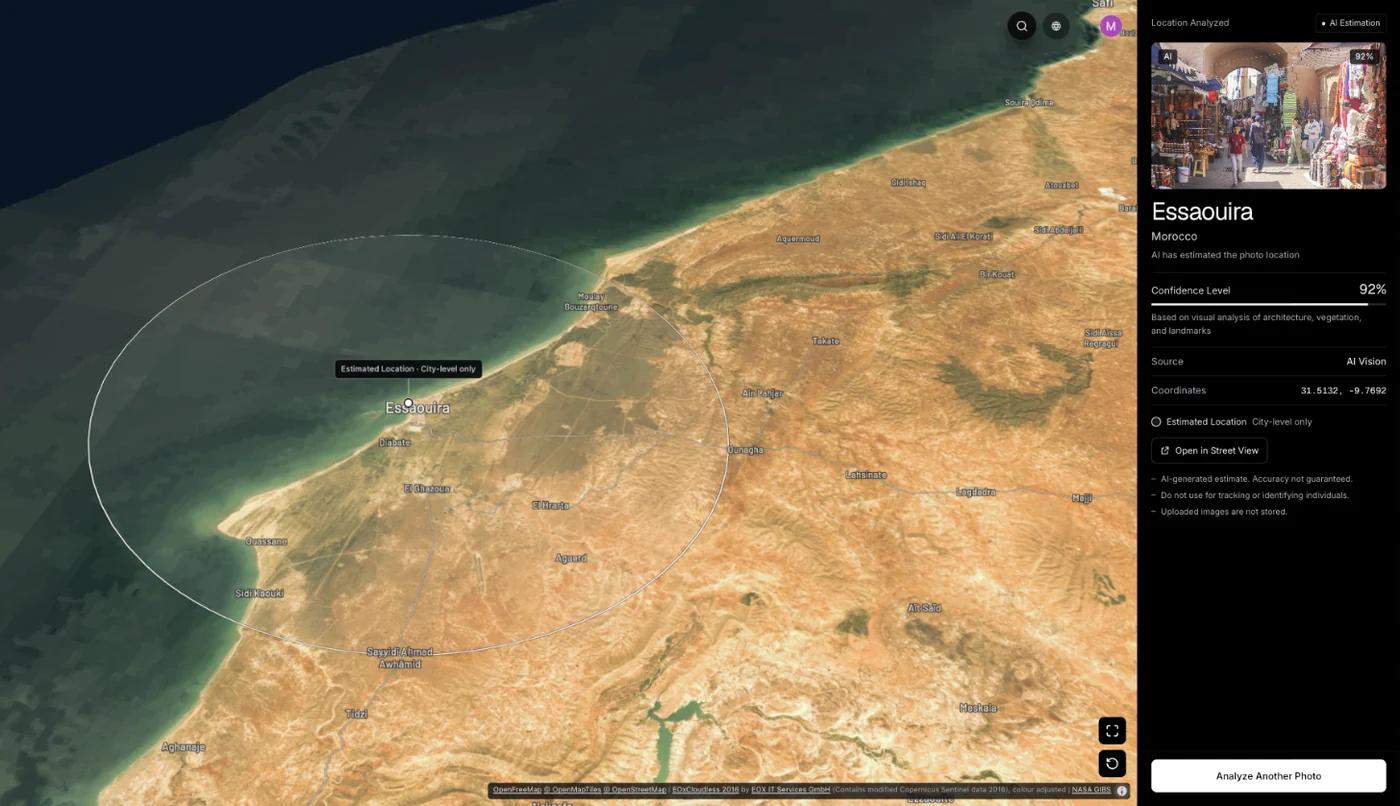
The method behind such tools is explained in how AI geolocation works. The practical rule: an estimate narrows the search, and a score is a hint rather than proof. On the site, a San Francisco street of Victorian row houses with no GPS data returns San Francisco, USA at 100% confidence, but a TikTok frame with a blurred background will usually give a wider answer.
Step 6: how do you confirm the answer?
Match fixed features, not impressions. Open map and street-level imagery for the candidate, then check that at least three things agree: the road layout, a building or bridge, and one small detail such as a sign or railing. If anything contradicts, discard the candidate.
- Find the candidate on a map and look at satellite imagery for the road shape and surroundings.
- Open street-level imagery where available and walk the route the camera took.
- Compare at least three fixed details; moving things such as cars and crowds prove nothing.
- Check the date. A clip might be recycled, and the place may have changed since.
- Search the place name with the hashtag or caption words to see whether other public posts show the same view.
Checking is the step people skip, and it matters most with viral content. Bellingcat’s beginner’s guide to social media verification walks through a case where a viral clip shared as one thing turned out to be something else: reverse searching a screenshot found a 2011 YouTube upload of the same footage. It also notes that old media being reposted out of context is more common than manipulated media. A "where" answer should always come with a "when" check.
Frequently asked questions
- How do I see the location of a TikTok video?
- Look for a location tag above the caption on the post. If the creator added one, tapping it shows the place and other public posts tagged there. If there is none, check the caption and comments, then work from the picture itself.
- Can you find where a TikTok was filmed without a location tag?
- Often yes, if the clip shows enough: signs, landmarks, road layout or distinctive scenery. Screenshot the clearest frame, reverse search it, read the visible clues and confirm any candidate on a map. Indoor or close-up clips may not be identifiable.
- Does a TikTok video contain GPS metadata?
- Do not count on it. The creator’s original file may have had coordinates, but copies saved from TikTok generally carry no usable GPS. TikTok does not document this, so check any file you have with an EXIF viewer such as ExifTool.
- Why can’t I add or see a location on TikTok?
- TikTok’s Help Center says location tags are available only in some regions, are not available to accounts under 18, and some places cannot be tagged. A missing option usually reflects those limits or device location settings.
- Is it okay to try to find where a TikTok was filmed?
- Identifying a public place such as a beach, a trail or a landmark is fine. Using clips to find where a specific person lives or spends their time is not, and can be harassment. Keep the question about the place.
Sources
- Location information on TikTok — TikTok SupportDescribes optional location tags on posts, regional availability, the under-18 restriction and places that cannot be tagged.
- A Beginner’s Guide to Geolocating Videos — BellingcatEliot Higgins, 2014. Landmarks, hand-sketched road layouts and satellite imagery.
- A Beginner’s Guide to Social Media Verification — BellingcatCase studies of recirculated footage, including a clip whose earlier YouTube upload dated from 2011.
- Search with an image on Google — Google Search HelpOfficial steps for searching with an image or Lens.
Keep reading
How to Find Where a Video Was Filmed
Find where a video was filmed: read GPS from the original file with ExifTool, pull sharp frames with FFmpeg, reverse search them and verify. Tested commands.
· 14 min read
How to Find Where an Instagram Photo Was Taken
Instagram strips photo metadata on upload, so the coordinates are gone before you see the post. What is left, what actually works, and where the limits are.
· 4 min read
Google Lens vs Yandex: Which Finds Places Better?
Two engines that fail on different photos. Which one to reach for when the subject is a building, a product, a landmark or an ordinary street.
· 4 min read
How to Identify a Country From Photo Clues
Regulated things beat natural things. The clues that change abruptly at borders, ordered by how much each one narrows the search and how fast you can read it.
· 4 min read
How Does AI Geolocation Work?
An AI geolocation model does not look anything up. It reads the same visual evidence a trained human would, and its limits follow directly from that.
· 4 min read