
Reverse Image Search vs AI Geolocation: Which Finds the Place?
By Arthur L. · · 8 min read
Short answer
Reverse image search finds places by matching your photo to copies already indexed online, so it works for famous or published images. AI geolocation estimates a place from what the picture shows, so it can handle photos that were never published. Use reverse search first, then AI.
Find where your photo was taken
Upload a photo: GeoSpy AI reads its GPS data if it has any, and otherwise estimates the place from what it shows.
Two kinds of tool answer the question "where is this?", and they work in opposite ways. One looks for your photo somewhere else on the web. The other reads the photo itself. Knowing which is which saves time, because each fails in exactly the situations the other handles well.
This page explains the difference and gives you a decision table. For a ranking of individual engines, see our roundup of reverse image search tools; for Google against Yandex specifically, our Google Lens vs Yandex comparison; and for the machinery behind the AI side, how AI geolocation works.
How does reverse image search find a location?
It compares your image with pictures already indexed on the web and returns pages containing the same or a similar image. If one of those pages names the place, you have your answer. The tool is not reading the location; it is finding someone who already did.
Google describes the results of a Lens search as including search results for objects in the picture, similar images, and websites that use the same or a similar image, according to its help page on searching with an image. That is the whole mechanism. The "location" comes from the caption, article or listing attached to a matching image, not from any analysis of the scene.
Scale is why it works so well on public places. In 2023, Google said Lens was handling 12 billion visual searches a month, in its timeline of Search milestones, and the web holds millions of tagged travel photos. A famous bridge, a plaza or a landmark has been photographed, captioned and indexed countless times.
Where reverse search is strongest
- Famous landmarks and tourist viewpoints.
- Photos that have been posted publicly: news images, listings, blog posts, stock sites.
- Images with readable text such as a shop name, which the engine can search directly.
- Checking whether a viral image is older than claimed, since an earlier upload shows up as a match.
Where it stalls
A never-published photo has no matches to find. A snapshot of an ordinary street, a hiking trail nobody captioned or a private interior returns look-alikes: pages with similar colors or shapes but no real connection. The more generic the scene, the more confident but wrong the matches look. Check any match against fixed details rather than overall mood.
How does AI geolocation find a place from a photo?
An AI geolocation model looks at what the image shows (architecture, signs, vegetation, light, road details) and estimates where in the world that combination occurs. It does not need a copy of the photo online, which is why it can work on images that were never published.
The question the model answers is different. Reverse search asks "have I seen this exact picture?". AI geolocation asks "which places look like this?". The first depends on the web’s memory; the second depends on patterns learned about how the world looks in different regions. Our explainer on how AI geolocation works goes through the approach in detail.
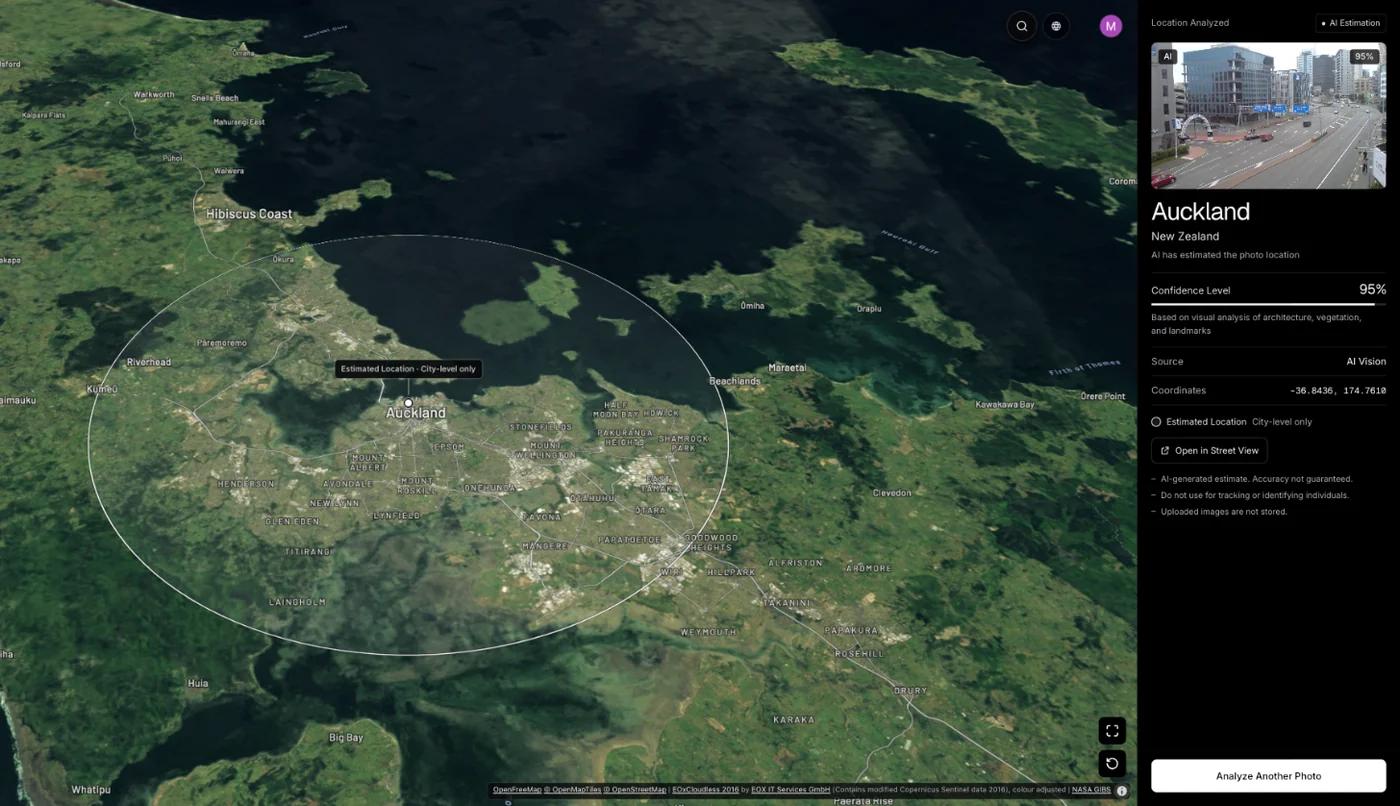
GeoSpy AI first reads GPS coordinates from the file’s EXIF data if present. If not, an AI model estimates the city and country from what the image shows. The output is shown on a map with a confidence score: the point it found, with its coordinates, when the AI is highly confident, and otherwise an approximate area. On the site, a San Francisco street photo of Victorian row houses with no GPS data returns San Francisco, USA at 100% confidence; Kyoto, Japan and the Grand Canyon each return 95%.
Where AI geolocation is strongest
- Photos that were never published, such as your own old camera roll or a file someone sent you.
- Scenes with distinctive regional character: architecture, vegetation, signage languages.
- Cases where you need a shortlist of cities to check, rather than an exact match.
Where it stalls
Interiors, close-ups and generic suburban scenes give any model little to work with, and the result is a wide region with a lower score. An estimate is also not a verification: it tells you where to look, not what is true. A good AI result still deserves a map check, the same as any other lead.
Which should you use: reverse image search or AI geolocation?
Start with reverse image search, because a match is the strongest evidence you can get and takes seconds. If it returns nothing useful, switch to AI geolocation for an estimate. Either way, confirm the answer against map imagery before you rely on it.
| Your photo is… | Better first choice | Why |
|---|---|---|
| A famous landmark or viewpoint | Reverse image search | Thousands of captioned copies exist |
| A news or social image of unknown origin | Reverse image search | Also reveals earlier uploads and original context |
| A private photo that was never posted | AI geolocation | No indexed copy exists to match |
| A street scene with no famous landmark | AI geolocation | Reads architecture, signs and vegetation |
| A photo with a clear shop or street sign | Search the text, then reverse search | Text is directly searchable |
| An original phone photo | EXIF viewer first | GPS may already be in the file |
| An interior or close-up | Neither is likely to work | Few location clues either way |
For the in-between cases, run both. They fail independently, so agreement between a reverse-search hit and an AI estimate is stronger than either alone. If they disagree, the disagreement itself is informative: look for what each might be missing, such as a lookalike building or a copy posted with the wrong caption.
Can reverse image search and AI geolocation be used together?
Yes, and that is usually the most reliable workflow. Run reverse search first to catch published photos, then AI for the rest, then read the clues yourself and confirm on a map. Each step narrows the question and catches the others’ mistakes.
- Step 1Check the fileLook for GPS in the original. If it is there, you can skip everything else. Finding location without EXIF covers what to do if not.
- Step 2Reverse search a clean cropUpload the scene without watermarks or interface overlays to two engines. Google Lens vs Yandex explains why to try more than one.
- Step 3Run an AI estimate if nothing matchesUse a photo location finder to get a city or region and confidence score.
- Step 4Read the clues yourselfSigns, language, transit, plants, road markings. Our OSINT geolocation workflow shows the discipline.
- Step 5Confirm on a mapMatch at least three fixed details in satellite or street-level imagery before drawing any conclusion.
Bellingcat’s guide to social media verification shows why the order matters. In one case it describes, a reverse search on a screenshot surfaced a 2011 YouTube upload of the same footage, proving a clip shared as recent was old. That is reverse search doing what it is best at. A place no one had ever published is where an AI estimate takes over.
What does each approach cost and cover?
Reverse image search in Google Lens or Yandex is free to use, but needs a match to exist. GeoSpy’s website analysis needs a subscription of $9.99 per week or $39.99 per year, cancel any time, or $1.99 once for a single photo; the iPhone app has a free trial, and the site’s Street View guessing game is free once a day.
There is also a Chrome extension: right-click a photo on any page to send it for analysis, which is the quickest way to try the AI route on an image you meet online. Reverse search is ideal for volume, since you can run several engines in minutes at no charge. AI estimates are for the cases those engines cannot answer. Using the free engines first, and a paid estimate only for what is left, is the economical order.
Frequently asked questions
- Can reverse image search find the location of a photo?
- Yes, if the photo or a close copy is already online with a caption or article naming the place. Famous and published images often match. A never-published photo usually returns only look-alikes, so another method is needed.
- What is the difference between reverse image search and AI geolocation?
- Reverse image search looks for your picture elsewhere on the web. AI geolocation analyzes what is in the picture and estimates where it was taken. The first needs an indexed match; the second does not.
- Is AI geolocation more accurate than Google Lens?
- Neither is better across the board. Google Lens is strongest on famous, published places, while AI geolocation can estimate a place from photos with no online copy. Which is more accurate depends on the photo, so try both and check on a map.
- How do I find the location of a photo that is not online?
- Check the file for GPS first. Then read the visible clues, such as signs, architecture and plants, and try an AI geolocation tool, which does not need a published copy. Confirm any candidate with satellite and street-level imagery.
- Which reverse image search is best for finding places?
- Google Lens suits famous landmarks and text, while Yandex often does better on ordinary streets and buildings. Using both gives the best coverage. Our comparison and tool roundup explain the differences in detail.
Sources
- Search with an image on Google — Google Search HelpOfficial description of Lens results: objects, similar images and pages that use the same or a similar image.
- Google Search: A timeline of the 25 biggest moments — GoogleGoogle’s 2023 timeline of Search milestones: 12 billion visual searches a month with Lens.
- A Beginner’s Guide to Social Media Verification — BellingcatCase where a reverse search found a 2011 YouTube upload of footage shared as recent.
Keep reading
The Best Reverse Image Search Tools, Compared
Google Lens, Yandex, Bing and TinEye do different things. A comparison of what each engine is good at, and when to reach for AI geolocation instead.
· 6 min read
Google Lens vs Yandex: Which Finds Places Better?
Two engines that fail on different photos. Which one to reach for when the subject is a building, a product, a landmark or an ordinary street.
· 4 min read
How Does AI Geolocation Work?
An AI geolocation model does not look anything up. It reads the same visual evidence a trained human would, and its limits follow directly from that.
· 4 min read
Can Google Lens Find a Location From a Photo?
Sometimes. Lens names famous landmarks and finds pages that show the same scene, but ordinary streets stump it. When to check GPS data or use an AI estimate.
· 14 min read
How to Find Photo Location Without EXIF Data
The metadata is gone, so what is left? Three approaches that work on a stripped photo, what each realistically achieves, and where they stop.
· 5 min read
We Tested an AI Photo Location Finder on 50 Photos (2026)
AI photo location finder accuracy, tested on 50 public photos with known spots: 90% landed within 25 km, 66% within 1 km. Every answer, misses included.
· 11 min read