
Can You Find Where a Photo Was Taken From a Link?
By Sam D. · · 6 min read
Short answer
A link alone cannot show where a photo was taken, because it is only an address. Open it and save the image file itself, read it with a metadata viewer for GPS and a date, check the page’s caption and location tag, then search by the image URL or estimate the place from what the picture shows.
Find where your photo was taken
Upload a photo: GeoSpy AI reads its GPS data if it has any, and otherwise estimates the place from what it shows.
A photo link looks as if it should know where the photo was taken. It does not: a URL tells your browser where to fetch a file, nothing more. What the link opens can still hold the answer, in the file’s metadata, in the page around the picture or in the picture itself. For the visual route, you can find location from a photo with AI; the steps below show what to check first.
This guide starts from a link. If you already have the file, see how to find where a photo was taken; to trace who first posted a picture, see where is this image from.
Does a link hold any location data?
No. A link is an address that tells a browser where to fetch a page or a file. It can hint at the site, the upload date or the file name, but GPS lives inside the image file, so what you need is the file the link points to.
Read the address anyway. The domain tells you who hosts the picture, and the path can carry more: WordPress can organize uploads into year and month folders, so a path such as /wp-content/uploads/2019/07/ shows when the file was uploaded. A file name that looks like a camera default suggests an original rather than a copy renamed by a platform.
How do you get the actual image file from a link?
Open the link in a browser, then open the image on its own, for example by right-clicking it and copying the image address. Save that file, not a screenshot or a preview, and read it with a metadata viewer for GPS, the capture date and the camera.
Use a photo metadata viewer on the saved file. Whether GPS is still there depends on the route the file took: platforms that publish photos usually re-encode them and drop the data, while services that pass the original file along keep it. Our guide to which apps strip EXIF data sorts the common routes, and why photos lose location when shared explains the mechanics. Read the capture date even without GPS; the photo date finder shows it.
Why is a link preview not the photo?
A preview in a chat or a post shows the image the page names for link shares, which can be a resized or cropped copy or a different picture altogether. Meta recommends at least 1200 × 630 pixels for these images. Save the image from the page itself, not the preview.
The page sets that image in its og:image tag, which the Open Graph protocol defines as an image URL that should represent the page. A news site may pick a crop of its main photo; a blog may use its logo. Either way, the preview file says nothing reliable about where the original was taken.
What can the page around the photo tell you?
Often more than the file. Read the caption, any location tag, the date posted, the photographer credit, the alt text and the comments. News and agency photos usually name the place in the caption, and a credit line leads to the photographer’s own archive.
Treat each detail as a claim to check. A location tag is chosen by the poster, and a caption can describe a different picture. On social platforms the post is usually the only record left, so read it closely; our guides cover Instagram and Facebook.
Can you search by the image URL?
Yes. Google’s search by image takes a pasted image link, TinEye accepts an image URL in its search box, and Bing Visual Search lets you paste an image or URL on a computer. A match can lead to an earlier post with a caption that names the place.
Copy the image address, not the page address, so the engine searches the picture itself. On TinEye, sort the results by Oldest to see the earliest known copies, which often lead to the original context or photographer. Google notes that it may store the URLs you search; TinEye says it does not save search images or add them to its index. For which engine fits which picture, see the best reverse image search tools.
Find photo location from a link in five steps
Open the link with care, save the real image, read its metadata, read the page around it, then search by the image URL and estimate the place from the picture. Stop as soon as one step gives a place you can confirm on a map.
- Step 1Open it with careOpening any link sends your IP address to the server that hosts it, as every web request does, and an IP address usually reveals your country and often your city. If a stranger sent the link, you can ask for the photo itself instead.
- Step 2Save the real fileOpen the image on its own and save it. Previews and screenshots are new files without the original’s metadata.
- Step 3Read the metadataLook for GPS, the capture date and the camera model in a metadata viewer.
- Step 4Read the pageCaption, location tag, date, credit and comments, each treated as a claim.
- Step 5Search, then estimateSearch by the image URL, then estimate the place from what the photo shows.
Can AI tell where a photo from a link was taken?
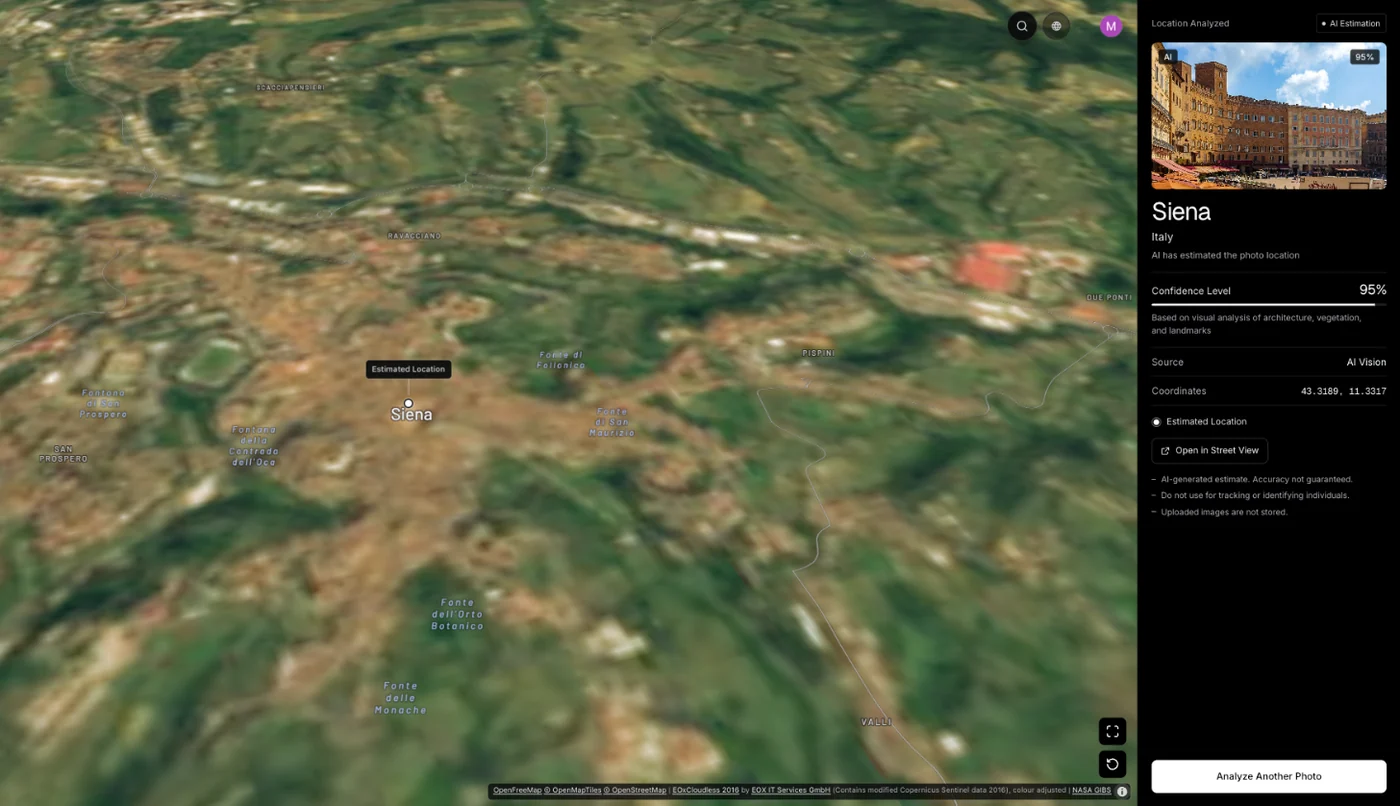
It can estimate it once you have the image. GeoSpy reads GPS from the file when it is there; without it, an AI model estimates the place from what the photo shows and returns a location with a confidence score on a map. Save the image from the link and upload the file.
Upload the saved file rather than a screenshot of it, so that any GPS the file still carries is read first. For how such models read a scene, see how AI geolocation works.
Frequently asked questions
- Can you find location from an image URL?
- Not from the URL itself. The URL leads to the file, and the file carries GPS only if the site kept its metadata. Save the image, read it in a metadata viewer, then search by the URL in Google, TinEye or Bing.
- Only through what the file and the page show. A link to an original file with GPS still inside lets anyone who downloads it read the coordinates, so strip them first with a metadata remover. The picture itself can also give a place away.
- Does a shortened link change anything?
- No. A short link only redirects to the full address, which then works like any other link. Opening it still sends your IP address to the servers along the way.
- What if the link no longer works?
- Search the address or the page title in an archive such as the Wayback Machine, and run any copy of the picture you have through a reverse image search to find other places it was posted.
Sources
- Images in Link Shares — Meta for DevelopersRecommends images of at least 1200 × 630 pixels for link shares; the minimum is 200 × 200 pixels.
- The Open Graph protocol — ogp.meDefines og:image as an image URL that should represent the page.
- Search with an image on Google — Google Search HelpSearch with a URL: copy the image address, then paste it under “Paste image link.”
- How to use TinEye to search for an image — TinEyeSearch by pasting an image URL; the Oldest sort shows the earliest known copies.
Keep reading
Where Is This Image From? How to Trace a Picture’s Origin
Where is this image from? Run a reverse image search, sort TinEye by oldest, check metadata and archives to find the first appearance of any picture.
· 6 min read
Why Do Photos Lose Location When Shared?
Photos lose location because platforms re-encode uploads, not because anyone chose to protect you. The mechanism, the routes that keep it, and why it matters.
· 4 min read
Which Apps Strip EXIF Data When You Share a Photo?
Which platforms remove photo metadata on upload and which pass it through untouched — plus how to test any app yourself in under two minutes.
· 4 min read
How to Find Photo Location Without EXIF Data
The metadata is gone, so what is left? Three approaches that work on a stripped photo, what each realistically achieves, and where they stop.
· 5 min read