
Does Facebook Show Where a Photo Was Taken?
By Sam D. · · 6 min read
Short answer
Not automatically. Facebook removes the GPS tag from the copy of a photo that other people can view and download, so the hidden coordinates are not exposed. A location does show if the poster adds a place tag or check-in, or if the scenery gives it away.
Find where your photo was taken
Upload a photo: GeoSpy AI reads its GPS data if it has any, and otherwise estimates the place from what it shows.
There are three separate things people mean by "photo location" on Facebook: the coordinates hidden inside the file, the place a person chooses to attach to a post, and what the picture simply shows. They behave differently, and mixing them up is how people end up either too worried or too relaxed.
Does Facebook remove location data from photos you upload?
Yes, from the version other people can see and download. Reporting and testing over several years agree that the GPS tag does not survive in the downloaded copy. The metadata is removed between upload and publication.
Photos taken on a phone usually carry EXIF data, which can include GPS coordinates, the camera model and the time. If you download a picture from a Facebook post, those location fields are not there. TidBITS summarised the reporting by Forbes: the data is stripped "between when you upload the photo and when it’s published on Facebook." That is why a stranger cannot right-click a Facebook photo and read your coordinates, which is the usual worry. For the general mechanics, see what EXIF data is.
Does Facebook keep the location of photos you upload?
Possibly. TidBITS, citing a Forbes report, said Facebook extracts the location data during upload and keeps it internally even though viewers cannot see it. Facebook has not published detail, so treat it as reported, not confirmed in its own documentation.
This is the part that gets lost. Stripping the tag from the public copy protects you from other users; it does not tell you what the company does with the data it read before stripping it. The same TidBITS article reported that Facebook confirmed the practice to Forbes. The practical response is the one it suggests: if you do not want the app reading your photos’ locations, limit its access to your photo library, or remove the location from the file before you upload. How to remove EXIF data walks through that, and which apps strip EXIF data compares what other platforms do.
Can people see a location on a Facebook post anyway?
Yes, when it is added on purpose. A check-in, a location tag on a post, or a Marketplace listing’s location is shown to whoever the post’s audience allows. That visible location is a choice made in Facebook, not something read from the file.
A check-in or place tag is attached by the person posting and appears with the post, so it is visible to the audience they selected. Facebook’s help pages explain how to control who sees what you share. Marketplace works similarly: Facebook’s help says you can set a location for a listing when you create it, and a listing’s location is part of how it is shown to nearby buyers. We could not verify from Facebook’s own pages exactly how much detail buyers see, so avoid putting an exact home address in a listing or its photos.
- Check who can see a post before you tag a place; the audience selector controls it.
- Remove a location tag by editing the post, if you tagged one by mistake.
- Be careful with check-ins at your home or your child’s school; a tagged place is public to the audience you picked.
Can someone work out where a Facebook photo was taken without the GPS tag?
Often, yes. The scenery survives stripping: signs, buildings, landscape and light. Reverse image search or an AI location tool can estimate a city from the picture alone, so removing the tag does not remove the evidence.
Metadata is only one way a photo reveals a place. A front yard, a street sign or a distinctive skyline in the background of a family photo can identify a neighbourhood. Why photos lose location when shared explains the metadata half; the rest is what the pixels show. If you are curious how this works in practice, find a photo’s location without EXIF lists the clues, and GeoSpy’s photo location finder shows the AI approach.
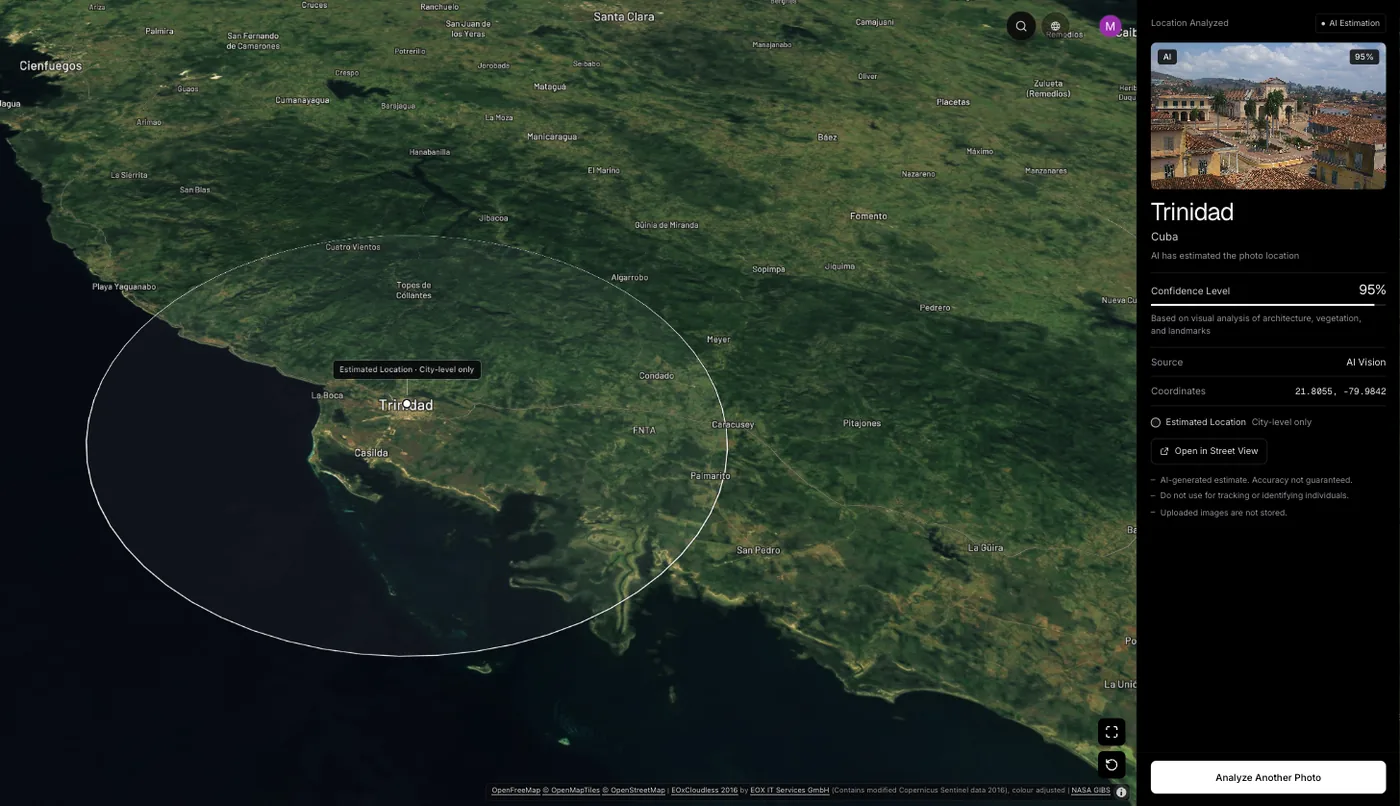
That tool reads GPS from a file’s EXIF data if it is present. Otherwise an AI model estimates the city and country from architecture, signs, vegetation and light, and shows the result on a map with a confidence score: the point it found, with its coordinates, when it is highly confident, and otherwise an approximate area. On the site’s samples, a San Francisco street of Victorian row houses with no GPS data returns San Francisco, USA at 100% confidence, Kyoto, Japan 95% and the Grand Canyon 95%. Website analysis needs a subscription ($9.99 a week or $39.99 a year, cancel any time) or $1.99 once for a single photo; the GeoSpy iPhone app has a free trial.
How do you share photos on Facebook without giving away where you are?
Remove the location from the file before uploading, leave check-ins off, post after you have left a place, and keep an eye on what is visible in the background. Set each post’s audience to the people you actually want to see it.
- On iPhone, tap Share, then Options, and turn Location off, or switch the Camera’s Location Services to Never (turn off location for iPhone photos).
- On Android, switch off Save location (Pixel) or Location tags (Samsung) in the camera settings.
- Leave out check-ins and place tags for your home, school and workplace.
- Post trip photos after you are back, as a vacation-posting guide explains.
- Crop or avoid house numbers, street signs and licence plates.
Where a precise tag does exist, it is precise: smartphone GPS is typically accurate to within about 5 metres (16 feet) in the open, according to GPS.gov. That is the level of detail the tag can reveal, and why it is worth keeping out of files you share outside Facebook, for instance by email or messaging apps that do not strip it.
Frequently asked questions
- Can you see the GPS coordinates of a photo downloaded from Facebook?
- Normally not. The downloaded copy has the location tag removed, so an EXIF viewer shows no coordinates. A place name appears only if the poster tagged one on the post itself.
- Does Facebook show the location of photos in Messenger?
- Facebook’s help pages do not document how Messenger handles photo metadata, so assume a file sent directly may keep its tags. Share a location-free copy if you are unsure.
- How do I remove the location from a Facebook post?
- Open the post’s menu, choose Edit post, and remove the place tag or check-in, then save. The exact menu labels can differ between the app and the website, and between versions.
- Does Instagram show where a photo was taken?
- Instagram shows a location only when the poster adds one to the post. For how it differs from Facebook, see finding an Instagram photo’s location.
- Can AI tell where a Facebook photo was taken?
- It can estimate a city or region from what the picture shows, such as signs and architecture. The result is a lead with a confidence score, not a street address, and should be verified against a map.
Sources
- How to Keep Facebook from Snooping on Your Photos’ Locations — TidBITSSummarises Forbes reporting: location stripped between upload and publication, but retained by Facebook.
- Change the location of your Facebook Marketplace listings — Facebook Help CenterYou can set a location for a listing when you create it.
- GPS Accuracy — GPS.govSmartphones are typically accurate to within a 4.9 m (16 ft) radius under open sky.
Keep reading
Why Do Photos Lose Location When Shared?
Photos lose location because platforms re-encode uploads, not because anyone chose to protect you. The mechanism, the routes that keep it, and why it matters.
· 4 min read
Which Apps Strip EXIF Data When You Share a Photo?
Which platforms remove photo metadata on upload and which pass it through untouched — plus how to test any app yourself in under two minutes.
· 4 min read
The Privacy Risks Hidden in Photo Metadata
What a geotagged photo gives away, why camera serial numbers matter as much as coordinates, and which habits cut the exposure without losing your archive.
· 5 min read
How to Find Where an Instagram Photo Was Taken
Instagram strips photo metadata on upload, so the coordinates are gone before you see the post. What is left, what actually works, and where the limits are.
· 4 min read
How to Remove EXIF Data From Your Photos
Strip GPS coordinates, timestamps and the camera serial number from a photo before you share it — on iPhone, Android, Windows and macOS, with no extra tools.
· 8 min read