
Where Is This Image From? How to Trace a Picture’s Origin
By Sam D. · · 6 min read
Short answer
To find where an image is from, run it through several reverse image search engines, sort TinEye results by oldest, and look for the earliest credible upload. Then check the file’s metadata and web archives to confirm the date. The earliest page you can document is usually the source.
Find where your photo was taken
Upload a photo: GeoSpy AI reads its GPS data if it has any, and otherwise estimates the place from what it shows.
People ask this question about two different things. Sometimes they want the source: who made the picture and where it first appeared online. Sometimes they want the place: where in the world it was taken. This article is about the first. If you need the place, how to find where a photo was taken covers that side.
Tracing a source is detective work with a simple rule. Every copy of an image online descends from an earlier copy, so you are walking backwards through time until you cannot go any further. The earliest copy you can document, with a date you can verify, is your answer.
How do you find the original source of an image?
Search the image on more than one reverse image engine, open the oldest matches, and compare them for higher resolution, credits and captions. The original is usually the largest, uncropped version on the earliest-dated page, often a photographer’s portfolio, an agency or a news site.
- Step 1Search with at least two enginesEngines index different parts of the web. Start with Google Lens, then try TinEye and Yandex. A comparison of the main tools shows which is better for which kind of picture.
- Step 2Sort for the oldest resultMost engines default to relevance, which favors popular copies. Switch to an oldest-first sort wherever it exists, as described below.
- Step 3Look for the cleanest versionOriginals tend to be larger, uncropped and free of watermarks added by reposters. A smaller copy with a banner across it is a later generation.
- Step 4Read the page, not just the pictureA byline, caption, licence line or photographer’s name on the earliest page tells you who made it and often when.
- Step 5Confirm the date independentlyCheck the page in a web archive and read any embedded metadata before you trust a single timestamp.
How does TinEye’s oldest-first sort help?
TinEye can sort matches by oldest, which puts the earliest crawled copies at the top. That is a strong lead, but the sort reflects when TinEye first found the image, not when it first appeared online, so treat it as a starting point.
TinEye states that its “Oldest” sort shows the earliest crawled images at the top, and that the order is based on when its crawlers first found an image rather than when it first went online. Wikipedia reports that TinEye claimed more than 77.6 billion images indexed as of September 2025. That scale is why the sort is useful, and why the result is a lead and not a verdict: the real first upload may sit on a page that was crawled later, or never crawled at all.
If TinEye returns nothing useful, its alternatives cover different parts of the web. For a head-to-head on the two biggest general-purpose engines, see Google Lens vs Yandex.
Can metadata show where an image came from?
Sometimes. If the file is an original, its metadata can name the camera, the creation date and the software used, and in some cases a copyright or creator field. Social platforms usually strip all of it, so a downloaded copy often carries nothing.
Check the file you were given, or the highest-resolution copy you found, with an EXIF viewer. Useful fields include the creation date, the camera model and any creator or copyright text. A date that is later than the earliest web appearance you found is a red flag that the file was re-saved or edited. Reading creation dates properly explains which timestamps to trust.
Missing metadata proves nothing on its own. Most platforms remove it on upload, which is why photos lose their tags when shared.
What if reverse image search finds nothing?
Crop to the distinctive part and search again, try a different engine, describe the content in words, and check archives and stock libraries. An image with no matches may be new, private, or very low resolution rather than untraceable.
- Crop out borders, captions and watermarks, then search the central subject.
- Flip or rotate the image if it may have been mirrored by a reposter.
- Search the Wayback Machine for the page where you found it, to see earlier versions with different captions.
- Try stock and agency libraries by keyword, since many are not indexed by general engines.
- Ask a community of researchers with the full context of where you saw it.
Also consider that the picture may be edited or generated. Checking whether a photo is real is worth doing before you build a story around an origin.
What if you need the place, not the publisher?
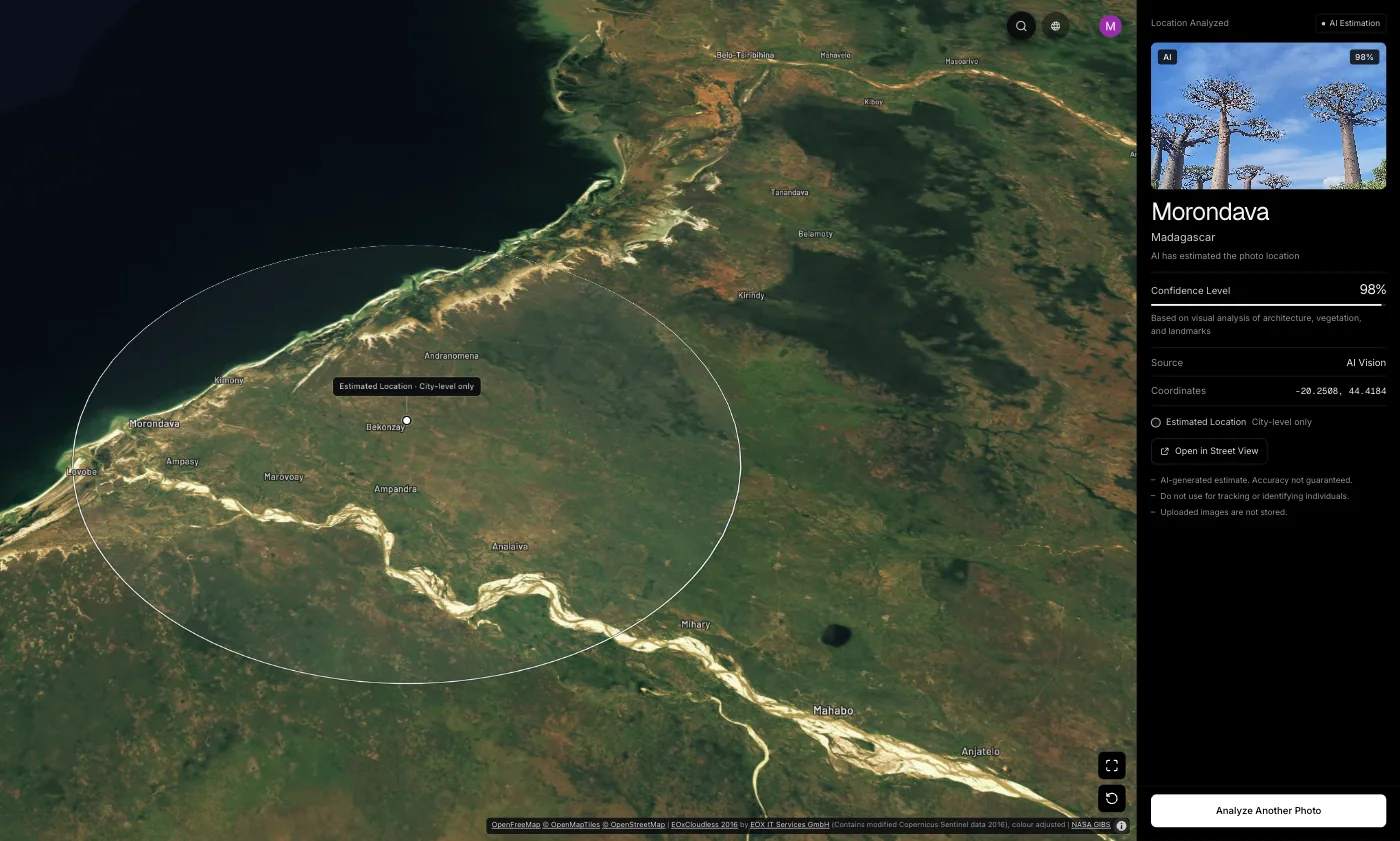
Use the source trail first, since a caption or credit often names the location. If none exists, read the visible scene: signs, architecture and terrain. GeoSpy reads GPS from the file when present, otherwise estimates a city and country from what the image shows.
Once you have the earliest page, its caption frequently settles the location question for free. When it does not, the picture itself becomes the evidence. GeoSpy first reads GPS coordinates from the file’s EXIF data if they are there; otherwise an AI model estimates the city and country from what the image shows, such as architecture, signs, vegetation and light. The result is shown on a map with a confidence score: the point it found, with its coordinates, when the AI is highly confident, and otherwise an approximate area. You can try it at the photo location finder. Photo analysis on the website needs a subscription ($9.99 a week or $39.99 a year, cancel any time) or $1.99 once for a single photo, and the iPhone app has a free trial.
Frequently asked questions
- How can I find where an image is from?
- Run it through Google Lens, TinEye and Yandex, open the oldest or highest-resolution matches, and read their captions and credits. Then confirm the date in a web archive.
- How do I find the first time an image appeared online?
- Sort TinEye results by oldest, then open each early page and check its own date. Cross-check in the Wayback Machine, because TinEye’s order shows when it crawled an image, not when it was published.
- Can I find where an image is from without a reverse image search?
- Yes. Check the file’s metadata, read any visible watermark or credit, search distinctive words from the content, and look in stock or agency libraries by keyword.
- Does a missing watermark mean the image is original?
- No. Reposters crop watermarks out all the time. Look for a larger, uncropped version on an earlier page instead.
- Is it legal to reverse search someone’s photo?
- Searching for a picture’s source is normal research. The risk lies in using results to locate or contact a private person, which can amount to harassment or stalking.
Sources
- Can I sort my results? — TinEye HelpThe “Oldest” sort shows the earliest crawled images and reflects crawl time, not publication time.
- TinEye — WikipediaOver 77.6 billion images indexed as of September 2025, per TinEye’s own claim.
Keep reading
The Best Reverse Image Search Tools, Compared
Google Lens, Yandex, Bing and TinEye do different things. A comparison of what each engine is good at, and when to reach for AI geolocation instead.
· 6 min read
TinEye Alternatives: What to Use for Which Job
TinEye answers a narrow question very well. Which tools replace it, which only look like they do, and when nothing else will actually work.
· 4 min read
Google Lens vs Yandex: Which Finds Places Better?
Two engines that fail on different photos. Which one to reach for when the subject is a building, a product, a landmark or an ordinary street.
· 4 min read
How to Verify if a Photo Is Real
Three separate questions hide inside "is this photo real". A verification order that answers each one, and the checks that fail more often than people expect.
· 4 min read